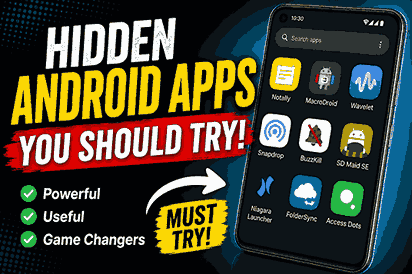
Have you ever been scrolling through the Play Store, downloading app after app, only to uninstall most of them a few days later? I’ve done exactly that. A while ago, I realized I was using the same handful of popular apps every day while ignoring hundreds of smaller ones that could actually make my phone more useful.
One weekend, I decided to spend a few hours exploring lesser-known Android apps instead of downloading whatever was trending. I wasn’t expecting much, but I ended up finding tools that genuinely improved the way I use my phone. Some helped me stay organized, while others made everyday tasks faster and more enjoyable.
If you’re someone who loves getting more out of your Android device, this list is for you. These hidden Android apps may not have the massive popularity of apps like WhatsApp or Instagram, but they offer practical features that deserve attention.
Rather than filling your phone with apps you’ll never open again, let’s look at a few hidden gems that are actually worth installing.
Why These Hidden Android Apps Are Worth Trying
Most people search for apps by looking at the “Top Charts” section of the Google Play Store. While those apps are popular for a reason, they aren’t always the best choice for every situation.
Many smaller developers create excellent apps that solve real problems but never receive the same level of promotion. That means some incredibly useful tools stay hidden even though they’re reliable, lightweight, and packed with helpful features.
Trying lesser-known Android apps can help you:
- Discover smarter ways to manage daily tasks.
- Improve your phone’s productivity.
- Reduce clutter with lightweight apps.
- Find privacy-friendly alternatives.
- Enjoy features missing from mainstream apps.
The key is choosing apps that are trusted, regularly updated, and have positive user reviews. The apps below meet those standards while offering something genuinely useful.
1. Notally
If you like keeping notes but find large note-taking apps overwhelming, Notally is a refreshing alternative.
It has a clean interface that lets you create notes, checklists, labels, reminders, and archives without unnecessary distractions. Everything feels fast, even on older Android phones.
Key Features
- Simple note editor
- Color-coded organization
- Checklist support
- Dark mode
- Lightweight design
Pros
- Easy to learn
- Fast performance
- Minimal battery usage
- Clean user interface
Cons
- Fewer advanced formatting options
- Not designed for large document creation
Best For
Students, professionals, and anyone who wants a simple note-taking app.
2. Snapdrop

Need to transfer files between your Android phone and computer without installing complicated software?
Snapdrop makes it surprisingly easy. As long as both devices are connected to the same Wi-Fi network, you can send photos, videos, documents, and other files in seconds. Go pairdrop in pc.
Key Features
- Wireless file sharing
- No account required
- Browser-based
- Fast transfers
- Cross-platform support
Pros
- Extremely simple
- No cables needed
- Works on multiple operating systems
Cons
- Requires the same Wi-Fi network
- Transfer speed depends on your connection
Best For
Anyone who frequently moves files between devices.
3. Niagara Launcher

If your home screen feels crowded with icons and widgets, Niagara Launcher offers a refreshing experience.
Instead of filling multiple pages with apps, it focuses on simplicity. Your favorite apps stay within easy reach, making one-handed use much more comfortable.
Key Features
- Minimal home screen
- Fast navigation
- Notification integration
- Personalized favorites
- Smooth performance
Pros
- Beautiful minimalist design
- Easy one-handed navigation
- Lightweight
Cons
- Different from traditional launchers
- May require a few days to get used to
Best For
People who prefer a clean and distraction-free Android experience.
4. BuzzKill

BuzzKill gives you more control over notifications than Android’s default settings.
Instead of simply muting notifications, you can create rules that automatically dismiss, repeat, delay, or organize alerts from specific apps.
Key Features
- Custom notification rules
- Auto-reply options
- Notification filtering
- Scheduled alerts
- Smart automation
Pros
- Saves time
- Reduces distractions
- Highly customizable
Cons
- Premium app
- Initial setup takes a little time
Best For
Users who receive dozens of notifications every day.
5. SD Maid SE

Even modern Android phones collect unnecessary files over time.
SD Maid SE helps identify leftover files, empty folders, duplicate data, and app leftovers that often remain after uninstalling applications.
Key Features
- Storage cleaner
- Duplicate finder
- Database optimization
- App cleaner
- Storage analysis
Pros
- Frees up storage
- Easy interface
- Regular updates
Cons
- Some features require the premium version
Best For
Anyone running low on storage or wanting a cleaner phone.
6. MacroDroid
If you’ve ever wished your phone could perform repetitive tasks automatically, MacroDroid is worth checking out. It lets you create simple automations without needing any coding knowledge.
For example, you can automatically turn on Wi-Fi when you arrive home, switch your phone to silent during office hours, or launch Spotify as soon as your Bluetooth headphones connect. Once you’ve set up a few automations, it’s hard to go back.
Key Features
- Easy automation builder
- Hundreds of ready-made templates
- Voice command support
- Location-based actions
- Battery-friendly performance
Pros
- Beginner-friendly interface
- Saves time every day
- No programming required
- Highly customizable
Cons
- Some advanced features require the Pro version
- A learning curve for complex automations
Best For
Anyone who wants to automate daily tasks and make their Android phone smarter.
7. Wavelet
If you listen to music through wired or wireless headphones, Wavelet can noticeably improve the sound quality.
Instead of buying expensive headphones, I found that adjusting the audio with Wavelet made my existing pair sound richer and more balanced. It supports automatic headphone profiles for many popular brands, making setup surprisingly easy.
Key Features
- AutoEQ for supported headphones
- Graphic equalizer
- Bass boost
- Limiter
- Channel balance controls
Pros
- Better sound quality
- Easy setup
- Works with most music apps
- Lightweight
Cons
- Some advanced controls require the paid version
- Results depend on headphone compatibility
Best For
Music lovers, podcast listeners, and anyone who wants better audio without replacing their headphones.
8. FolderSync

Keeping files backed up doesn’t have to be complicated.
FolderSync allows you to automatically sync folders between your Android device and cloud storage services like Google Drive, Dropbox, OneDrive, and more. It’s especially useful if you regularly take photos or work with important documents.
Key Features
- Automatic cloud syncing
- Scheduled backups
- Multiple cloud providers
- Two-way synchronization
- Secure file transfers
Pros
- Reliable backups
- Supports many cloud services
- Flexible scheduling
- Saves manual effort
Cons
- Initial setup may take a few minutes
- Advanced options can feel overwhelming for beginners
Best For
Users who want their files backed up safely without having to remember to do it manually.
Common Mistakes When Downloading Hidden Android Apps
Finding hidden gems is exciting, but it’s easy to make mistakes that could affect your phone’s performance or security.
Downloading from Untrusted Sources
Always install apps from the Google Play Store or the developer’s official website. Unknown sources can expose your device to malware.
Ignoring Permissions
Take a moment to review the permissions an app requests. A flashlight app probably doesn’t need access to your contacts or location.
Installing Too Many Apps
It’s tempting to download every interesting app you discover, but having too many installed can slow down your phone and make it harder to stay organized.
Forgetting to Update Apps
Updates often include security improvements, bug fixes, and new features. Keeping your apps updated helps them run smoothly.
Skipping User Reviews
Before installing any app, spend a minute reading recent reviews. They often reveal issues that screenshots and descriptions don’t mention.
Frequently Asked Questions
Yes, as long as you download them from trusted sources like the Google Play Store and check user reviews before installing.
Most of the apps listed are lightweight and perform well even on older devices, though compatibility depends on your Android version.
Many offer free versions with useful features. Some also include optional premium upgrades for advanced functionality.
Not usually. In fact, several apps on this list are designed to improve performance, reduce clutter, or automate tasks efficiently.
Useful wardrobe essentials include quality jeans, plain t-shirts, button shirts, comfortable sneakers, a versatile jacket, and classic trousers. Add neutral sweaters and one dressy outfit for special events. These timeless basics mix easily with trend pieces, making daily styling simpler while saving money and maximizing outfit combinations effectively.
Final Thoughts
The Play Store is full of popular apps that almost everyone knows about, but some of the best Android experiences come from apps that don’t receive the same attention. Exploring lesser-known options can help you discover tools that genuinely improve the way you use your phone every day.
Whether you’re looking for better productivity, smarter automation, cleaner storage, or improved sound quality, these hidden Android apps offer practical value without unnecessary complexity.
Instead of filling your phone with dozens of trendy apps, try installing one or two from this list and see how they fit into your daily routine. You might end up finding your next favorite app where very few people are looking.
Thanks for visiting our site.