Top 5 Must-Have Apps for Students in 2025 to Study Smarter (Free & Useful)

Studying in 2025 is not just about books and lectures anymore. Students today struggle with time management, phone distractions, messy notes, and poor focus. The good news? The right mobile apps can make studying easier, smarter, and less stressful.
Instead of working harder, students should study smarter — and that’s exactly what these apps help with.
In this guide, you’ll discover the top 5 must-have apps every student needs in 2025. These apps are:
- Free or freemium
- Easy to use
- Helpful for daily study life
- Tested and trusted by students worldwide
Let’s get started.
1. Notion – All-in-One Study Planner & Notes App
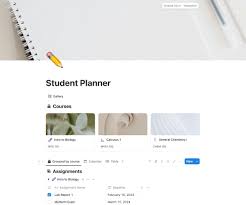
Best for: Organized students, college & university level
Available on: Android, iOS, Web
Free version: ✅ Yes
Notion is one of the most powerful apps a student can use in 2025. Instead of using separate apps for notes, tasks, and schedules, Notion puts everything in one place.
🔹 Why students love Notion
- Create digital notes for every subject
- Plan assignments and exams
- Track deadlines and progress
- Customize study dashboards
🔹 Best features for students
- Ready-made student templates
- To-do lists with deadlines
- Weekly and monthly study planners
- Cloud sync across devices
🔹 Who should use it?
If you:
- Forget deadlines
- Have messy notebooks
- Want everything organized digitally
👉 Notion is perfect for you.
Tip: Start simple. Use one study planner template instead of overcomplicating things.
2. Forest – Beat Phone Addiction & Improve Focus
Best for: Focus, deep study sessions
Available on: Android, iOS
Free version: ✅ Yes (basic)
One of the biggest problems students face is phone addiction. Notifications, social media, and messages ruin focus. Forest solves this problem in a smart and motivating way.
🔹 How Forest works
- You plant a virtual tree
- The tree grows while you stay focused
- If you leave the app → the tree dies 🌱❌
Simple, but very effective.
🔹 Why it’s great for studying
- Encourages deep focus
- Ideal for Pomodoro technique
- Reduces phone usage naturally
- Feels rewarding instead of strict
🔹 Best use case
- While studying for exams
- Reading books
- Solving assignments
Many students say Forest helped them reduce phone usage by 50% or more.
3. Google Keep – Quick Notes & Revision Saver
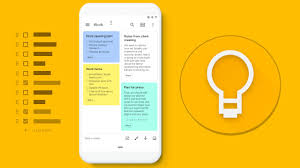
Best for: Short notes, reminders, revision
Available on: Android, iOS, Web
Free: ✅ Yes
Not every note needs to be long. Sometimes you just want to save:
- Key formulas
- Important definitions
- Quick reminders
That’s where Google Keep shines.
🔹 Key features
- Write quick notes instantly
- Voice notes (great for ideas)
- Color-coded notes for subjects
- Image notes (capture whiteboards)
🔹 Why students should use it
- Perfect for last-minute revision
- Syncs with Google account
- Super fast and lightweight
👉 Many students use Google Keep during lectures to save quick points without distraction.
4. Microsoft To Do – Simple Task & Assignment Manager
Best for: Daily tasks, assignment tracking
Available on: Android, iOS, Web
Free: ✅ Yes
If you feel overwhelmed by tasks and deadlines, Microsoft To Do can bring clarity.
🔹 What makes it useful
- Clean and simple interface
- Daily task lists
- Due date reminders
- Works perfectly with Outlook
🔹 Student benefits
- Plan daily study goals
- Never forget assignments
- Break big tasks into small steps
Instead of stressing about “too much work,” this app helps you focus on one task at a time.
5. Grammarly – Write Better Assignments & Emails
Best for: Writing, grammar, clarity
Available on: Android, iOS, Web
Free version: ✅ Yes
Poor grammar can reduce marks, even if your ideas are good. Grammarly helps students write clear, professional, and mistake-free content.
🔹 What Grammarly fixes
- Grammar mistakes
- Spelling errors
- Sentence clarity
- Tone improvement
🔹 Best for students who:
- Write assignments
- Send emails to teachers
- Prepare essays or reports
Even the free version is enough for most students and improves writing confidence massively.
Quick Comparison Table
| App | Best For | Free Version |
|---|---|---|
| Notion | Notes & planning | Yes |
| Forest | Focus & discipline | Yes |
| Google Keep | Quick notes | Yes |
| Microsoft To Do | Task management | Yes |
| Grammarly | Writing improvement | Yes |
Which Apps Should You Actually Use?
You don’t need all 5 apps. Choose based on your problem:
- ❌ Poor focus → Forest
- ❌ Messy notes → Notion
- ❌ Forget tasks → Microsoft To Do
- ❌ Weak writing → Grammarly
- ❌ Revision issues → Google Keep
Start with 2–3 apps only. Keep it simple.
Final Thoughts
Studying smarter in 2025 is about using the right tools, not working 24/7. These apps help students:
- Save time
- Reduce stress
- Improve focus
- Get better results
Remember:
Apps don’t study for you — you do.
Apps just make the journey easier.
If you use these tools consistently, you’ll notice real improvement in your study routine.
🔗 Links
- Best Productivity Apps for Students
- How to Stay Focused While Studying Using Apps
- Free Study Apps for Android Users



Its like you read my mind! You seem to know so much about this, like you wrote the book in it or something.
I think that you could do with a few pics to drive the message home a
little bit, but instead of that, this is fantastic blog. A fantastic read.
I’ll certainly be back.
thanks, where you from