Why Everyone Is Talking About AI Image Generation
A few months ago, I needed a thumbnail for one of my blog posts. Normally, I would spend thirty to forty minutes searching through free stock photo websites, only to realize that thousands of other websites were using the same images. The result was always the same: my content looked ordinary before anyone even clicked on it.
A friend suggested trying an AI image generation tool. Honestly, I expected something cartoonish or obviously fake. I typed a simple prompt asking for a modern workspace with a laptop, coffee mug, and soft lighting. Less than a minute later, I had four original images that looked better than most premium stock photos I had used before.
That moment completely changed how I create visual content.
Since then, I have used AI image generators for blog featured images, YouTube thumbnails, social media posts, presentations, and even simple product mockups. They save an incredible amount of time, but they also come with a learning curve. Your first prompts probably won’t produce the masterpiece you’re imagining, and that’s perfectly normal.
The technology has improved rapidly over the past year. Today’s leading tools produce sharper, more realistic images, follow prompts more accurately, and integrate directly into creative workflows. Many creators now choose different tools depending on whether they need photorealism, artistic illustrations, commercial-safe assets, or editable designs.
This guide is based on practical experience rather than theory. I’ll show you what actually works, the mistakes I made early on, and how you can start creating better AI images without wasting hours experimenting.
What Is an AI Image Generation Tool?
The simplest way to explain an AI image generation tool is this:
Imagine describing a picture to an incredibly talented digital artist who can finish the artwork in under a minute.
Instead of opening complicated design software and drawing everything manually, you simply describe what you want.
For example:
“A cozy coffee shop during rainfall with warm lights reflecting on the wet street, cinematic photography.”
The AI studies your words and generates completely new images based on patterns it has learned. It isn’t copying one existing picture. Instead, it creates a fresh image that matches your description.
Modern AI image generators can produce:
- realistic portraits
- fantasy artwork
- anime illustrations
- product photography
- architectural concepts
- YouTube thumbnails
- blog illustrations
- logos and icons
- social media graphics
One thing I learned quickly is that different tools have different strengths. If I need cinematic artwork, I usually reach for Midjourney. If I need editable marketing graphics, Adobe Firefly fits better. When I want to brainstorm ideas conversationally, generating images directly in ChatGPT or Google Gemini feels much more natural because I can refine the result through follow-up prompts.
My First Experience Using an AI Image Generator
My first week was honestly frustrating.
I thought writing something like:
“Beautiful office”
would magically create a professional image.
Instead, I received random-looking offices that didn’t match what I had in mind.
After watching experienced creators and experimenting myself, I realized the problem wasn’t the AI.
The problem was my prompt.
Once I started adding meaningful details, everything improved.
Instead of writing:
“A cat.”
I tried:
“A fluffy orange cat sleeping beside a rainy window on a wooden table, soft morning sunlight, realistic photography, shallow depth of field.”
The difference felt enormous.
That simple lesson taught me something important.
AI isn’t a mind reader.
The quality of your prompt often determines the quality of the result.
Another mistake I made was constantly generating new images instead of refining the existing ones. Most modern tools allow you to make small adjustments, such as changing the lighting, replacing the background, or improving facial expressions. Those edits often produce better results than starting from scratch every time. Over time, I developed a habit of treating AI like a creative partner rather than a vending machine that instantly delivers perfection.
How AI Image Generation Actually Works
A lot of people imagine AI searching Google Images and stitching pictures together.
That isn’t how modern image generation works.
Today’s systems rely on advanced generative AI models that have learned relationships between language and visual concepts. When you type a prompt, the model interprets objects, colors, composition, lighting, styles, and context, then gradually builds an entirely new image. Recent advances have also improved prompt understanding, making it easier for AI to place objects correctly and preserve consistent styles across multiple generations.
Text Prompts
Everything begins with your description.
The AI breaks your sentence into concepts like:
- subject
- environment
- colors
- lighting
- camera angle
- artistic style
- mood
The more precise these details are, the more likely the output will match your vision.
AI Models
Different tools are powered by different models, and those models have unique strengths.
Some prioritize artistic creativity.
Others focus on realism.
Others are optimized for commercial design, typography, or product photography.
This is why the same prompt can produce dramatically different images across platforms.
Image Refinement
Modern AI rarely stops after generating the first image.
Most tools let you:
- upscale quality
- remove unwanted objects
- change backgrounds
- regenerate specific areas
- improve facial details
- create multiple variations
These editing capabilities have become one of the biggest reasons professionals now use AI alongside traditional design software instead of replacing it outright. Even companies like Disney have emphasized that AI works best as a creative assistant that speeds up workflows while leaving artistic direction in human hands
Best AI Image Generation Tools in 2026
After trying dozens of AI image generators over the past year, I realized there isn’t one perfect tool for everyone. Each one shines in a different situation. Some create incredibly realistic photos, while others are better for digital art, marketing graphics, or quick brainstorming. I used to jump between tools hoping one would do everything, but that only slowed me down. Once I understood each platform’s strengths, my workflow became much smoother.
If you’re just starting out, don’t worry about trying every tool on day one. Pick one that fits your needs, learn how to write good prompts, and become comfortable with it before exploring others. The biggest improvement in image quality usually comes from better prompting rather than constantly switching platforms.
Here’s a quick comparison of the most popular AI image generation tools available today.
| Tool | Best For | Ease of Use | Free Plan | Standout Feature |
|---|---|---|---|---|
| ChatGPT Images | Every day image creation, brainstorming | ⭐⭐⭐⭐⭐ | Yes | Natural conversation and image editing |
| Midjourney | Artistic and cinematic artwork | ⭐⭐⭐⭐ | Limited | Exceptional visual quality |
| Adobe Firefly | Commercial design and marketing | ⭐⭐⭐⭐⭐ | Yes | Commercial-friendly generation |
| Google Gemini | Fast image generation and ideation | ⭐⭐⭐⭐⭐ | Yes | Integrated AI assistant |
| Stable Diffusion | Advanced users and customization | ⭐⭐⭐ | Yes | Open-source flexibility |
Instead of asking which one is “the best,” ask which one is best for your project. A YouTube creator may love Midjourney, while a blogger creating feature images every week might find ChatGPT Images faster and easier.
ChatGPT Images
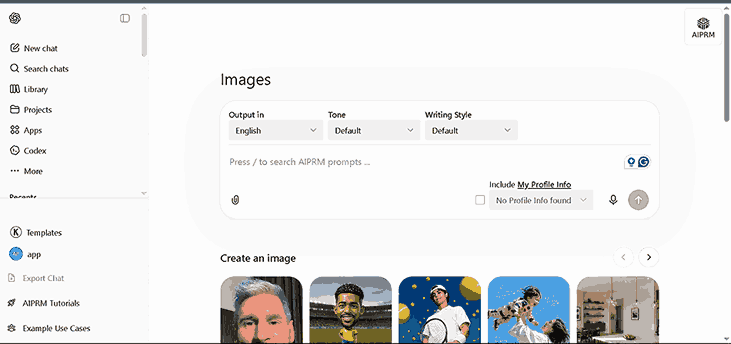
This is the tool I use most often because it fits naturally into my workflow. Rather than opening a separate application, I can describe an idea, generate an image, ask for changes, and continue refining it in the same conversation. That feels surprisingly natural, almost like working with a designer who understands feedback instead of starting from scratch each time.
One feature I appreciate is iterative editing. If the background looks too busy or the lighting feels too dark, I simply ask for those specific changes. There’s no need to rewrite the entire prompt. That saves time, especially when I’m creating blog featured images or social media graphics where small adjustments matter.
Another advantage is that ChatGPT can help write better prompts before generating the image. If my original idea is vague, I ask it to improve the prompt, making the final result much stronger.
Midjourney
If visual quality is your top priority, Midjourney is hard to ignore.
The first time I tried it, I was honestly surprised by how cinematic the images looked. The lighting, colors, textures, and composition often resemble professional photography or concept art rather than AI-generated graphics.
This makes Midjourney a favorite among:
- YouTube creators
- Game designers
- Digital artists
- Book cover designers
- Marketing agencies
The downside is that beginners may find it less intuitive than some other platforms. Learning prompt styles takes practice, and you’ll probably spend a few days experimenting before consistently getting the results you want. Once you understand how it interprets prompts, though, the quality can be outstanding.
Adobe Firefly
Adobe Firefly feels like it was built for designers who already work inside the Adobe ecosystem. If you’ve used Photoshop or Illustrator before, Firefly fits naturally into that workflow.
What impressed me most is how easily you can edit AI-generated content afterward. Instead of accepting the image as final, you can continue refining it with professional design tools. That’s especially useful for businesses creating advertisements, presentations, or branded graphics where every detail matters.
Another reason many professionals prefer Firefly is its focus on commercially safe content. If you’re creating images for clients or business projects, having a tool designed with licensing in mind provides extra peace of mind.
Google Gemini
Google Gemini has become much more capable than many people realize. While most people think of it as a chatbot, its image generation abilities have improved significantly.
I often use Gemini when brainstorming ideas because the conversation flows naturally. If I’m unsure about a thumbnail concept or blog illustration, I can ask for multiple creative directions before generating images. That combination of planning and creation saves time.
Gemini also works well for students, educators, and professionals who want quick visuals without learning complex prompt engineering.
Stable Diffusion
Stable Diffusion is different from the other tools because it offers far more customization.
If you’re the type of person who enjoys tweaking settings, experimenting with models, installing extensions, or training custom styles, Stable Diffusion gives you incredible flexibility. I’ve experimented with it on several personal projects, and while the learning curve is steeper, the creative possibilities feel almost endless.
That freedom comes with responsibility, though. Beginners sometimes become overwhelmed by the number of options. My advice is simple: master one easier tool first, then explore Stable Diffusion when you’re ready for deeper customization.
How to Write Better AI Image Prompts
This is where most beginners struggle.
People often believe AI produces random results, but the truth is that vague prompts usually create vague images.
Think of your prompt as giving directions to a photographer. If you simply say, “Take a nice picture,” they’ll have to guess what you mean. If you explain the location, lighting, mood, camera angle, and style, the final image becomes much closer to your vision.
Here’s a basic prompt:
“A modern office.”
Now compare it with this:
“A modern minimalist office with a wooden desk, ultrawide monitor, indoor plants, warm morning sunlight coming through large windows, realistic photography, shallow depth of field, 8K quality.”
The second prompt gives the AI much more context, which usually leads to dramatically better results.
A simple formula I use is:
Subject + Environment + Lighting + Style + Camera Angle + Mood + Quality
For example:
“A young entrepreneur working on a laptop in a cozy coffee shop, warm golden-hour lighting, realistic photography, eye-level camera angle, shallow depth of field, highly detailed.”
Whenever my images don’t look right, I rarely blame the AI anymore. Instead, I improve the prompt. That small mindset shift has probably doubled the quality of my results.
Step-by-Step Guide to Creating Your First AI Image
Creating your first AI-generated image is much easier than most people expect. The challenge isn’t clicking the “Generate” button—it’s learning a workflow that consistently produces images you’re actually happy with.
Here’s the process I personally follow.
Step 1: Decide the purpose
Before writing anything, ask yourself one simple question:
Why am I creating this image?
Is it for:
- a blog post?
- a YouTube thumbnail?
- an Instagram post?
- a presentation?
- An advertisement?
Knowing the purpose changes everything. A thumbnail needs bold, eye-catching visuals, while a blog image often benefits from a cleaner and more informative style.
Step 2: Visualize the scene
Close your eyes for a moment and imagine the final image.
Who’s in it?
What’s happening?
Where is it?
What emotions should people feel?
This mental picture makes writing prompts much easier.
Step 3: Write your first prompt
Don’t try to make it perfect.
Write the best description you can.
Generate the image.
See what works.
Notice what feels wrong.
Then improve it.
Step 4: Refine instead of restarting
This is probably the biggest lesson I’ve learned.
Don’t delete everything because one small detail looks wrong.
Instead, change one thing at a time.
Maybe:
- brighten the lighting
- remove extra objects
- change the camera angle
- improve facial expressions
- add depth
- increase realism
Small refinements often produce much better results than completely new prompts.
Step 5: Upscale and export
Once you’re satisfied with the composition, use the tool’s upscale or enhancement feature if available. This improves sharpness and makes the image more suitable for blogs, presentations, social media, or print.
I also recommend saving your successful prompts. Over time, you’ll build a personal library that makes future projects much faster because you can reuse and adapt prompts instead of starting from scratch.
Real-Life Uses of AI Image Generation
When I first started using an AI image generation tool, I thought it would only help me create blog featured images. A few weeks later, I realized I was using it almost every day for completely different tasks. That’s when it clicked: AI image generation isn’t just another creative trend. It’s becoming part of the normal workflow for bloggers, marketers, students, freelancers, and business owners.
The best part is that you don’t need to be a designer to create something that looks professional. You still need creativity and good ideas, but you no longer have to spend years learning complex design software before bringing those ideas to life.
Let’s look at some of the most practical ways people are using AI-generated images today.
AI Image Generation for Blogging
As someone who publishes blog content regularly, this is probably where I’ve seen the biggest difference.
Before AI, finding the right featured image usually meant searching through dozens of stock photo websites. Even after spending twenty or thirty minutes, I often ended up with an image that looked generic because thousands of other websites were using the same photo.
Now my process is much simpler.
I write the article first, think about what the reader should visualize, and generate a custom image that matches the topic perfectly. If I’m writing about productivity, I can create a modern workspace with the exact lighting, colors, and mood I want. If the article is about cybersecurity, I can generate a futuristic scene instead of relying on another overused padlock image.
Custom visuals also help strengthen your brand. When readers notice that your graphics have a consistent style, your website starts to feel more professional and memorable. AI doesn’t replace good writing, but it does make your content more visually appealing, which can improve engagement and encourage visitors to stay on the page longer.
Creating Better YouTube Thumbnails
Every YouTuber knows that even the best video can struggle if nobody clicks on it.
I’ve experimented with AI-generated thumbnail concepts, and one thing became obvious very quickly: the first idea isn’t always the best one. Instead of settling for a single design, I now generate several different concepts before choosing my favorite.
For example, if I’m making a tutorial about AI tools, I might generate:
- a futuristic workspace
- a glowing robot assistant
- a dramatic before-and-after scene
- a clean minimalist design
- a colorful digital art concept
Seeing multiple directions helps me decide which style matches the video’s message.
One important lesson I’ve learned is not to rely entirely on AI for thumbnails. Sometimes the generated text is incorrect, or facial expressions look unnatural. I often combine AI-generated backgrounds with manually added titles, branding, and personal photos. This hybrid approach usually produces the best results.
Social Media Content
Social media moves incredibly fast, and creating fresh graphics every day can become exhausting.
AI image generators make that process much easier.
Instead of recycling the same templates, you can quickly create unique visuals for Instagram, Facebook, LinkedIn, Pinterest, or X. Seasonal campaigns, motivational quotes, educational posts, and promotional graphics become much faster to produce because you’re starting with original artwork instead of a blank canvas.
I’ve also noticed that AI works well for brainstorming. Even if I don’t use the first generated image, it often sparks ideas I wouldn’t have considered on my own. In that sense, AI becomes less of a replacement for creativity and more of a creative partner.
Freelancing and Client Projects
Many freelance designers, content creators, and marketers now use AI to speed up parts of their workflow without sacrificing quality.
For example, a client might ask for five concept images before choosing a final direction. Instead of spending hours building each concept manually, AI can produce several polished ideas in minutes. Once the client selects a favorite, the freelancer can refine it further using traditional design tools.
That doesn’t mean clients expect “one-click” artwork. They still value originality, good communication, and thoughtful revisions. AI simply helps reduce repetitive work so you can spend more time improving the final product.
Marketing and Small Businesses
Small businesses often struggle to create professional visuals because hiring a designer for every campaign isn’t always affordable.
AI image generation helps bridge that gap.
Whether you’re promoting a new product, designing an email banner, creating social media ads, or illustrating a blog post, AI can provide high-quality visuals quickly. Restaurant owners can generate promotional artwork, online stores can create lifestyle scenes around their products, and service-based businesses can design attractive graphics without a large marketing budget.
That said, consistency still matters. Using similar colors, styles, and branding across your AI-generated images helps your business look more trustworthy and recognizable.
Common Mistakes Beginners Should Avoid
After experimenting with AI image generators for months, I’ve made plenty of mistakes. Some wasted time, while others produced images that looked nothing like what I had imagined. Fortunately, most of these mistakes are easy to avoid once you know what to look for.
The biggest mistake is writing prompts that are far too short. A request like “beautiful office” leaves too much room for interpretation. The AI has to guess the furniture, lighting, colors, camera angle, and overall mood. A few extra details can completely transform the result.
Another common mistake is expecting perfection on the first attempt. AI generation is usually an iterative process. Professional creators rarely accept the very first image. They refine prompts, regenerate variations, adjust compositions, and make small edits until the image feels right.
Ignoring composition is another issue. Beginners often focus only on the main subject and forget about the background, lighting, or perspective. Those supporting details are what make an image feel polished and realistic.
Finally, don’t copy prompts blindly from the internet. They can be helpful for learning, but the best results usually come from understanding why a prompt works and adapting it to your own project. Developing your own prompt-writing style will make you much more confident over time.
Are AI-Generated Images Copyright Safe?
This is one of the most common questions people ask, and it’s an important one.
The short answer is that it depends on the platform you’re using and how you plan to use the images.
Different AI image generation tools have different licensing terms. Some allow commercial use with very few restrictions, while others have limitations depending on your subscription plan or the content you generate. That’s why it’s always a good idea to read the official usage policy before using AI-generated images in client work, advertising, or products you intend to sell.
It’s also worth remembering that AI should be used responsibly. Avoid generating content that copies a specific artist’s unique style too closely, uses protected trademarks without permission, or creates misleading or harmful images. Respecting intellectual property and ethical guidelines helps protect both your reputation and your business.
If you’re working on commercial projects, choose platforms that clearly explain their licensing policies and keep records of the images and prompts you create. That simple habit can save a lot of confusion later.
Final Thoughts
When I created my first AI-generated image, I thought it was just another interesting technology that would fade away after a few months.
I couldn’t have been more wrong.
Today, AI image generation has become part of my regular workflow. It helps me brainstorm faster, create unique blog graphics, experiment with YouTube thumbnails, and visualize ideas that would have taken much longer to design manually.
The biggest lesson I’ve learned is that AI doesn’t replace creativity—it amplifies it. The better your ideas, the better your prompts become, and the better your prompts become, the better your images look.
If you’re completely new to this, don’t worry about mastering every feature immediately. Pick one AI image generation tool, start with simple prompts, experiment often, and pay attention to what works. Every project teaches you something new, and before long you’ll have your own prompt library and creative workflow.
Like any skill, improvement comes through practice rather than perfection. Keep exploring, keep refining, and most importantly, enjoy the creative process.
Related posts:
AI for business
top 10 ai tools for students free
AI Writing Tools: 27 Best AI Writing Assistants Tested in 2026
Frequently Asked Questions
1. What is the best AI image generation tool for beginners?
For most beginners, tools that offer a conversational interface and simple editing options are the easiest starting point. They allow you to refine images through natural language without learning complicated settings or prompt syntax.
2. Can I use AI-generated images on my blog?
Yes, in many cases you can, provided the tool’s licensing terms allow commercial use. Always review the platform’s official policy before publishing images on monetized websites or client projects.
3. Do I need design experience to use AI image generators?
Not at all. Basic creativity and clear descriptions are often more important than professional design skills. As you practice writing better prompts, the quality of your images will naturally improve.
4. Why don’t my AI-generated images match my imagination?
The most common reason is that the prompt lacks enough detail. Including information about the subject, environment, lighting, style, mood, and camera angle usually produces much more accurate results.
5. Will AI replace graphic designers?
AI is better viewed as a powerful assistant than a replacement. It speeds up brainstorming, concept creation, and repetitive tasks, while skilled designers still bring creativity, strategy, branding, and human judgment that AI cannot fully replicate.