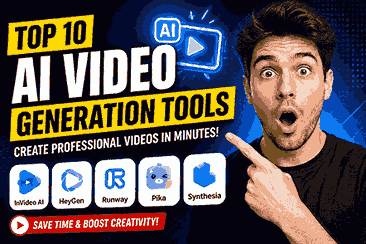
My First Experience with AI Video Generation Tools
A few months ago, I wanted to make a short promotional video for a small side project. I wasn’t aiming for anything fancy—just a clean 30-second clip that looked professional enough to post on social media.
I thought it would take an hour.
I was wrong.
After downloading editing software, searching for stock footage, recording a voice-over, and trying to line everything up on the timeline, I had already spent most of my afternoon. The video still didn’t look the way I imagined.
That’s when I decided to give one of the AI video generation tools a try.
To be honest, I didn’t expect much. I assumed it would create something that looked robotic or full of obvious AI mistakes. But after spending about 20 minutes learning the interface, I generated my first video.
It wasn’t perfect.
Some transitions felt a little awkward, and one AI voice sounded too mechanical. Still, compared to spending several hours editing everything manually, it was a huge improvement.
That experience completely changed how I approach video creation.
Now I still edit important projects by hand when needed, but AI has become the starting point for almost every video I create. Instead of beginning with a blank timeline, I begin with an AI-generated draft and improve it from there. It saves time without taking away creative control.
If you’re curious about AI video generation tools but aren’t sure where to begin, this guide will walk you through everything I’ve learned, including what works well, what doesn’t, and how to avoid the mistakes I made early on.
What Are AI Video Generation Tools?
The simplest way to describe AI video generation tools is this:
They are applications that create videos automatically based on text, images, prompts, or existing media.
Instead of manually editing every clip, adding transitions one by one, recording narration, or searching for visuals, you simply describe what you want. The AI handles much of the heavy lifting.
For example, you might type:
“Create a 30-second promotional video about a fitness app with energetic background music and modern animations.”
Within a few minutes, the tool can generate a complete draft containing visuals, transitions, subtitles, voice-over, and music.
Of course, the first version usually isn’t perfect. You’ll often want to adjust scenes, replace images, or fine-tune the script. But starting with a solid draft is much faster than building everything from scratch.
That’s one of the biggest reasons AI video generation tools have become so popular among content creators, freelancers, marketers, teachers, and business owners.
How Do AI Video Generation Tools Work?
Although every platform works a little differently, most follow the same basic process.
Step 1: You Provide an Input
This could be:
- A written prompt
- A blog article
- A product description
- A script
- A few images
- Existing video clips
The better your input, the better your results.
Step 2: The AI Understands Your Request
The software analyzes your text and tries to understand:
- The subject
- The mood
- The audience
- The style
- The pacing
This is why detailed prompts usually produce much better videos than short, vague instructions.
Step 3: It Builds the Video Automatically
The AI starts combining different elements, including:
- Visuals
- Animations
- Stock footage
- AI-generated scenes
- Voice narration
- Background music
- Captions
- Scene transitions
Instead of spending hours editing, you receive a nearly complete video within minutes.
Step 4: You Make Final Adjustments
This is the step many beginners skip.
Even the best AI video generation tools aren’t perfect. I almost always make a few changes before exporting, such as:
- Replacing generic stock footage
- Correcting pronunciation
- Shortening long scenes
- Improving subtitles
- Adding my own branding
- Adjusting music volume
These small edits can make an AI-generated video look much more polished and professional.
Who Should Use AI Video Generation Tools?
One thing I appreciate most is that these tools aren’t limited to professional editors. They can help almost anyone create better videos with less effort.
Some of the people who benefit the most include:
- YouTube creators
- Small business owners
- Freelancers
- Digital marketers
- Teachers
- Online course creators
- Social media managers
- Startup founders
- Bloggers turning articles into videos
- Students working on presentations
Even if you’ve never edited a video before, many AI tools offer templates that make the learning process much easier.
Why AI Video Generation Tools Are Becoming So Popular
When I first started using AI for video creation, I assumed it was just another trend that would fade away in a few months. But after using these tools regularly, I realized they solve a very real problem: creating quality videos takes a lot of time.
Whether you’re a YouTuber, freelancer, business owner, or student, you’re probably juggling multiple tasks already. Spending six or seven hours editing a single video isn’t always practical. That’s where AI video generation tools really shine.
They don’t replace creativity. They simply remove many of the repetitive tasks that slow you down.
Let’s look at the biggest reasons why more creators are making AI part of their workflow.
They Save an Incredible Amount of Time
This was the biggest advantage I noticed.
Before using AI, a simple one-minute promotional video usually involved:
- Writing a script
- Searching for stock footage
- Recording narration
- Editing scenes
- Adding captions
- Choosing music
- Exporting multiple versions
Even with experience, this could easily take three to five hours.
Now, I can generate a rough first draft in less than fifteen minutes using an AI video generation tool. It still needs a few edits, but starting with a completed draft is much faster than staring at an empty editing timeline.
If you create videos regularly, those saved hours add up quickly.
You Don’t Need Advanced Editing Skills
Traditional video editing software can feel overwhelming when you’re just getting started.
The first time I opened a professional editor, I spent more time figuring out where everything was than actually editing the video.
AI tools simplify the process.
Most platforms ask you simple questions like:
- What’s your topic?
- Who is your audience?
- What style do you want?
- How long should the video be?
The AI handles much of the technical work in the background.
This makes video creation much less intimidating for beginners.
Creating Content Becomes More Consistent
One challenge I faced was consistency.
Some weeks, I had plenty of time to edit videos. Other weeks I was too busy, and my publishing schedule fell apart.
AI helped solve that problem.
Instead of postponing every project until I had an entire free day, I could generate a solid draft quickly and finish the final edits later.
That consistency matters if you’re building:
- A YouTube channel
- A blog with video content
- A business page
- A personal brand
- A social media account
Publishing regularly is often more important than making every video perfect.
AI Helps Turn Ideas into Videos Faster
Sometimes I know exactly what I want to say, but I don’t feel like spending hours editing.
Now my workflow usually looks like this:
- Write a short script.
- Paste it into an AI video generator.
- Review the generated scenes.
- Replace anything that doesn’t fit.
- Export.
Instead of letting ideas sit in my notebook for weeks, I can turn them into actual videos the same day.
That speed makes it easier to stay motivated.
Many Tools Include Everything in One Place
Years ago, creating a video often meant switching between several different apps.
I had one program for editing, another for captions, another for voice recordings, and yet another for background music.
Many modern AI video generation tools combine these features into one workspace.
Depending on the platform, you can:
- Generate a script
- Create visuals
- Add AI voice narration
- Insert subtitles
- Include background music
- Resize videos for different platforms
- Export in high quality
Having everything in one place makes the process much smoother.
They’re Great for Short-Form Content
If you’ve ever tried making videos for platforms like YouTube Shorts, Instagram Reels, or TikTok, you know how quickly you need to produce content.
Short videos may only last 30 to 60 seconds, but they still require planning and editing.
AI speeds up that process significantly.
You can generate multiple variations of the same idea, test different hooks, and publish more consistently without spending your entire day editing.
AI Doesn’t Replace Creativity
One misconception I hear often is that AI makes every video look the same.
That hasn’t been my experience.
The quality of the final video still depends heavily on the person using the tool.
The AI provides the foundation, but you’re still responsible for:
- Writing a good script
- Choosing the right visuals
- Editing awkward scenes
- Adding your own personality
- Making sure everything feels natural
I treat AI like an assistant rather than a replacement.
The better instructions I give it, the better the results become.
Best AI Video Generation Tools Worth Trying
After experimenting with several platforms, I found that each one has its own strengths. None of them is perfect for every situation, so choosing the right tool depends on the type of videos you want to create.
Here are some of the best AI video generation tools that have consistently impressed me.
1. Synthesia
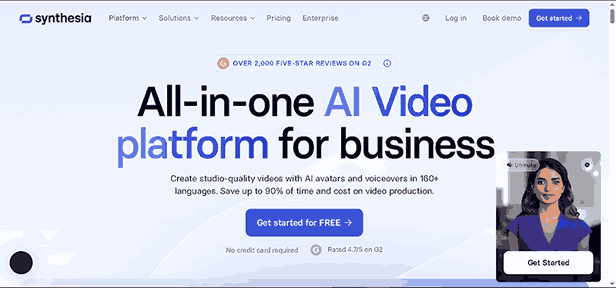
If you want professional presenter-style videos without hiring someone to appear on camera, Synthesia is one of the strongest options available.
Best For
- Business presentations
- Employee training
- Educational content
- Corporate communication
What I Like
- Realistic AI avatars
- Multiple language support
- Professional voice options
- Clean interface
Drawback
It’s better suited for presentation-style videos than highly cinematic projects.
2. Runway
Runway is one of the most exciting AI video tools I’ve used.
It offers advanced AI features that go beyond simple video creation, including object removal, background replacement, image-to-video generation, and creative visual effects.
Best For
- Content creators
- Designers
- Filmmakers
- Creative projects
What I Like
- Excellent AI-powered editing
- Modern interface
- High-quality visual output
- Constantly adding new AI features
Drawback
Some advanced tools require a bit of practice before you feel comfortable using them.
3. Pika
Pika has quickly become popular for creating short AI-generated videos from text prompts.
It’s especially useful if you enjoy experimenting with creative animations and cinematic scenes.
Best For
- Social media content
- Creative storytelling
- Animation
- Short promotional clips
What I Like
- Fast video generation
- Easy prompt-based workflow
- Impressive animation quality
Drawback
Long-form videos are still easier to create with other platforms.
4. InVideo AI
This is one of the easiest tools for beginners.
Instead of manually editing every scene, you describe the video you want, and the AI builds an editable draft in minutes.
Best For
- YouTube videos
- Marketing content
- Blog-to-video conversion
- Beginners
What I Like
- Very beginner-friendly
- Huge media library
- AI script assistance
- Quick editing process
Drawback
Some automatically selected clips may need replacing to better match your message.
5. VEED AI
VEED combines video editing with AI-powered features, making it a practical choice for creators who need captions, translations, and quick edits.
Best For
- Interviews
- Tutorials
- Social media videos
- Educational content
What I Like
- Automatic subtitles
- AI voice tools
- Easy browser-based editor
- Clean user experience
Drawback
Complex cinematic edits still require more advanced software.
My Personal Recommendation
If you’re completely new to AI video generation tools, don’t feel pressured to test every platform at once.
I’d start with one beginner-friendly option, learn its workflow, and create five to ten videos before trying something else.
That’s exactly what I did.
At first, I kept switching between different tools, hoping to find the “perfect” one. Instead, I wasted time learning new interfaces over and over again.
Once I committed to a single platform for a few weeks, my videos improved much faster because I focused on creating content instead of constantly exploring new features.
More Powerful AI Video Generation Tools Worth Exploring
The first few tools I mentioned are excellent starting points, but they’re not the only options available. As I became more comfortable with AI video generation, I started experimenting with other platforms to see how they compared.
Some were better for marketing videos, while others stood out for creating realistic avatars or turning simple text into engaging visuals.
Here are a few more tools that deserve your attention.
6. HeyGen
If you’ve ever watched a video where a realistic digital presenter speaks directly to the camera, there’s a good chance it was created with HeyGen.
This platform focuses on AI avatars that look surprisingly natural. Instead of recording yourself, you can type a script, choose an avatar, and let the AI deliver your message.
Best For
- Product demos
- Business presentations
- Customer support videos
- Training materials
What I Like
- High-quality AI avatars
- Natural voice options
- Multiple language support
- Easy script editing
Drawback
Avatar-based videos may not suit every type of content, especially creative storytelling.
7. Canva Magic Media
Many people already use Canva for graphic design, but its AI video features are becoming more impressive every month.
If you’re already familiar with Canva, the learning curve is almost nonexistent.
You can generate short video clips, animations, and social media content without leaving the platform.
Best For
- Instagram Reels
- Marketing videos
- Educational graphics
- Small businesses
What I Like
- Beginner-friendly interface
- Huge template collection
- Easy drag-and-drop editing
- Everything stays inside Canva
Drawback
It’s better suited for short-form content than full cinematic productions.
8. Adobe Firefly Video
Adobe has brought its AI technology into video creation, and the results are promising.
If you’ve previously worked with Adobe Premiere Pro or Photoshop, Firefly feels like a natural extension of that ecosystem.
Its biggest strength is generating creative visuals while giving users plenty of editing control afterward.
Best For
- Professional creators
- Marketing teams
- Designers
- Commercial projects
What I Like
- High-quality AI generation
- Strong creative controls
- Works well with Adobe software
- Reliable output quality
Drawback
New users may need some time to understand the available features.
9. Kapwing AI
Kapwing has always been popular among social media creators, and its AI features make content creation even faster.
I particularly like it for quick edits.
Need automatic subtitles?
Done.
Want to remove filler words from a talking-head video?
It can help with that too.
Best For
- YouTube Shorts
- TikTok
- Instagram Reels
- Quick editing
What I Like
- Browser-based editing
- AI subtitle generation
- Simple interface
- Great collaboration features
Drawback
It’s designed more for editing existing videos than creating complex AI-generated scenes.
10. Luma AI
Luma AI stands out because it focuses on creating realistic 3D scenes and cinematic visuals.
If you’re interested in filmmaking or creating eye-catching product showcases, it’s definitely worth exploring.
Best For
- Product videos
- Creative filmmaking
- Visual storytelling
- Experimental projects
What I Like
- Beautiful visual quality
- Smooth camera movements
- Realistic environments
- Creative flexibility
Drawback
Generating high-quality scenes can take longer than simpler AI video tools.
How to Choose the Right AI Video Generation Tool
When I first started, I made a mistake that many beginners make.
I searched for “best AI video generator,” signed up for the highest-rated platform, and expected it to solve every problem.
It didn’t.
After trying several tools, I realized there’s no single “best” option for everyone. The right choice depends on what you’re trying to create.
Here are the factors I always consider before choosing an AI video generation tool.
1. Think About the Type of Videos You Want to Make
Ask yourself a simple question:
What kind of videos will I create most often?
For example:
- YouTube tutorials
- Product reviews
- Business presentations
- Marketing ads
- Educational lessons
- Social media clips
- Animated stories
Some tools specialize in AI avatars, while others focus on cinematic visuals or quick social media videos.
Choosing a platform that matches your goals will save you time and frustration.
2. Consider Your Budget
AI video generators come with different pricing models.
Some offer generous free plans, while others require a monthly subscription for advanced features.
Before paying for any premium plan, I recommend testing the free version first.
This helps you answer questions like:
- Is the interface easy to use?
- Does the video quality meet your expectations?
- Are there annoying limitations?
- Does it fit your workflow?
You don’t want to commit to a subscription only to realize it doesn’t suit your needs.
3. Look at Video Quality
One of the first things I notice when testing a new platform is the quality of the final video.
Ask yourself:
- Do the animations feel smooth?
- Are the AI voices natural?
- Do transitions look professional?
- Is the footage relevant?
- Does the video feel polished?
Even if a tool generates videos quickly, poor quality can hurt your content.
4. Check Customization Options
AI should help you create videos—not lock you into a template.
Good platforms let you customize almost everything, including:
- Colors
- Fonts
- Music
- AI voices
- Scenes
- Images
- Logos
- Brand colors
- Captions
The more control you have, the easier it is to create videos that reflect your unique style.
5. Export Quality Matters
Imagine spending an hour creating a great video only to discover the free version exports it with a large watermark or in low resolution.
I’ve been there, and it’s disappointing.
Before investing your time, check:
- Maximum export resolution
- Watermarks
- File formats
- Download limits
- Commercial usage rights
These details can make a big difference, especially if you’re creating content for clients or your business.
Step-by-Step Guide to Creating Your First AI Video
If you’ve never used an AI video generation tool before, don’t worry. The process is much simpler than it sounds.
Here’s the workflow I follow for most of my projects.
Step 1: Decide on Your Goal
Before opening any software, think about what you want the video to achieve.
For example:
- Teach something
- Promote a product
- Explain a service
- Entertain viewers
- Increase social media engagement
Having a clear goal makes every other decision easier.
Step 2: Write a Simple Script
One lesson I learned early on is that AI can’t fix a weak script.
Keep your writing:
- Short
- Clear
- Conversational
- Focused on one idea
Read it aloud before generating the video. If it sounds awkward when spoken, rewrite it until it feels natural.
Step 3: Choose the Right AI Tool
Now pick the platform that best fits your project.
For example:
- Synthesia for AI presenters.
- Runway for creative visual effects.
- InVideo AI for quick marketing videos.
- Canva Magic Media for social media content.
- HeyGen for business communication.
Using the right tool from the beginning saves time later.
Step 4: Generate the First Draft
Paste your script into the AI video generator and let it create the initial version.
Don’t expect perfection.
Treat the first draft as a starting point rather than the finished product.
I usually generate two or three versions before deciding which one to improve.
Step 5: Edit and Personalize
This is where your creativity makes the biggest difference.
Replace generic visuals, adjust scene timing, refine captions, add your branding, and make sure the AI voice sounds natural.
Even ten minutes of manual editing can transform an average AI-generated video into something that feels much more authentic.