Introduction
Finding a job is stressful enough. Spending hours trying to make your resume look professional only adds to the frustration.
A few months ago, I was helping a friend update his resume for a software support role. He had the skills, some solid freelance experience, and a couple of certifications, but his resume looked plain and unorganized. We downloaded a few free templates, copied sections from old resumes, and even tried editing everything manually in Word. After nearly three hours, it still didn’t look impressive.
That’s when we decided to try an AI resume tool.
Within minutes, it suggested stronger bullet points, improved the summary, fixed awkward wording, and organized the layout into something that looked far more professional. It wasn’t perfect, but it gave us a much better starting point than a blank page ever could.
That experience changed my opinion about AI resume builders.
Since then, I’ve tested many of them while helping friends, reviewing resumes, and experimenting with different job descriptions. Some genuinely make resume writing easier, while others rely more on flashy templates than useful features.
If you’re wondering which AI resume tools are actually worth using, this guide shares my experience with the best options available in 2026.
My Experience Using AI Resume Tools
Before trying AI, I thought creating a resume was mostly about choosing a nice-looking template.
I quickly learned that recruiters care much more about clear writing, relevant skills, measurable achievements, and an ATS-friendly format than colorful designs.
One mistake I made early on was adding too much information.
I believed listing every project, certificate, and responsibility would make a resume stronger. Instead, it became long, repetitive, and difficult to read.
AI helped me realize something important.
A good resume isn’t about writing more.
It’s about writing the right things.
Several AI resume tools suggested shorter bullet points, stronger action verbs, and clearer descriptions of work experience. Even small improvements like replacing “Responsible for customer support” with “Resolved customer issues while maintaining high satisfaction ratings” made the resume sound more professional.
Another lesson I learned was that AI should assist you, not replace you.
Some tools generated achievements that sounded impressive but weren’t true. That’s a mistake you should never make. Recruiters often ask questions during interviews, and it’s much easier to discuss real experience than something AI invented.
Today, I use AI to improve wording, organize content, and tailor resumes for specific jobs—but I always review every suggestion before sending an application.
What Are AI Resume Tools?
AI resume tools are applications that use artificial intelligence to help people create, edit, and improve resumes.
Instead of staring at a blank document, wondering what to write, these tools guide you through the process by suggesting professional wording, organizing sections, and highlighting important skills.
Many platforms can also:
- Improve grammar and readability
- Generate professional summaries
- Rewrite weak bullet points
- Recommend job-specific keywords
- Create matching cover letters
- Check for ATS compatibility
- Suggest better formatting
Some even compare your resume with a job description and recommend changes that could improve your chances of passing applicant tracking systems.
The goal isn’t to write your entire resume for you.
The goal is to help you present your real experience in a clearer and more professional way.
How AI Resume Tools Work
Although every platform is a little different, most AI resume builders follow a similar process.
Step 1: Add Your Information
You’ll usually start by entering details such as:
- Work experience
- Education
- Skills
- Certifications
- Projects
- Contact information
Some tools also let you upload an existing resume instead of starting from scratch.
Step 2: Choose a Resume Template
Next, you’ll select a layout.
Most AI resume tools offer several templates designed for different industries.
For example:
- Professional
- Modern
- Minimal
- Creative
- Executive
If you’re applying online, simple ATS-friendly templates are usually the safest choice.
Step 3: Let AI Improve Your Content
This is where AI becomes helpful.
Instead of leaving your original text unchanged, it can:
- Rewrite weak bullet points
- Suggest stronger action verbs
- Improve grammar
- Shorten long sentences
- Highlight achievements
- Recommend industry-specific keywords
You’ll still have full control over what gets included.
Step 4: Review Everything Carefully
This is the step many people skip.
AI suggestions aren’t always accurate.
Before downloading your resume, double-check:
- Dates
- Job titles
- Company names
- Skills
- Certifications
- Achievements
Never assume AI knows your career better than you do.
AI Resume Builder vs Traditional Resume Templates
Many people wonder whether it’s better to use AI or simply download a free resume template.
Both approaches have their place, but they offer very different experiences.
Traditional Resume Templates
Traditional templates are essentially blank designs.
You fill in every section yourself, write every sentence manually, and decide how to organize the content.
They’re useful if you’re already confident in your writing skills.
Advantages
- Usually free
- Full creative control
- Simple to customize
Disadvantages
- Time-consuming
- No writing assistance
- Easy to overlook important details
- Doesn’t optimize content for specific jobs
AI Resume Builders
AI resume builders go beyond formatting.
They actively help improve your resume by suggesting better wording, organizing information, and making your content more relevant to the role you’re applying for.
Advantages
- Saves time
- Improves wording
- Suggests stronger achievements
- Helps optimize resumes for ATS
- Generates cover letters
- Easier for beginners
Disadvantages
- Requires careful review
- Premium features often require a subscription
- Can sometimes generate generic suggestions if you provide very little information
From my experience, AI resume builders are the better choice for most people, especially if you’re creating a resume for the first time or applying to several jobs.
Who Should Use AI Resume Tools?
One thing I noticed while testing different platforms is that they aren’t just useful for job seekers with years of experience.
Almost anyone preparing a resume can benefit from them.
Students
Students often struggle because they have limited work experience.
AI tools can help present internships, academic projects, volunteer work, and certifications in a more professional way.
Fresh Graduates
Graduates entering the job market usually need guidance on what employers expect.
AI resume builders provide structure and improve the overall presentation of their qualifications.
Professionals
Experienced professionals can use AI to modernize older resumes, tailor applications for different roles, and save time when applying to multiple positions.
Freelancers
Freelancers often have projects instead of traditional employment history.
AI can organize these projects into a format that’s easier for recruiters to understand.
Career Changers
Changing careers isn’t easy.
AI resume tools can help emphasize transferable skills and rewrite experience so it’s more relevant to a new industry.
Benefits of Using AI Resume Tools
After testing multiple platforms, these are the biggest advantages I noticed.
They Save Time
Instead of spending hours writing and rewriting every section, AI gives you a solid first draft within minutes.
They Improve Writing
Professional wording can make a big difference.
Simple changes in phrasing often make experience sound clearer and more impactful.
They Help with ATS Optimization
Many employers use Applicant Tracking Systems (ATS) to filter resumes before a recruiter even sees them.
Several AI resume tools recommend keywords and formatting that improve compatibility with these systems.
They Make Customization Easier
Applying to different jobs usually means adjusting your resume each time.
AI can quickly tailor summaries, skills, and bullet points for different job descriptions.
They Reduce Writer’s Block
Sometimes the hardest part is knowing what to write.
AI suggestions provide a useful starting point, making it much easier to finish your resume.
Quick Comparison Table
Before diving into detailed reviews, here’s a quick comparison of the AI resume tools covered in this guide.
| Tool | Best For | Free Plan | ATS Friendly | Starting Price |
|---|---|---|---|---|
| Kickresume | Beginners | Yes | Yes | Paid plans available |
| Teal | Job tracking | Yes | Yes | Paid plans available |
| Resume.io | Fast resume creation | Limited | Yes | Paid plans available |
| Enhancv | Modern resumes | Limited | Yes | Paid plans available |
| Rezi | ATS optimization | Yes | Yes | Paid plans available |
| Zety | Professional resumes | Limited | Yes | Paid plans available |
| Novoresume | Students | Yes | Yes | Paid plans available |
| Canva AI | Creative resumes | Yes | Partial | Paid plans available |
| VisualCV | Professionals | Limited | Yes | Paid plans available |
| Resume Genius | Guided resume building | Limited | Yes | Paid plans available |
| Huntr | Job seekers | Yes | Yes | Paid plans available |
| Resume Worded | Resume feedback | Yes | Yes | Paid plans available |
| Jobscan | ATS optimization | Limited | Yes | Paid plans available |
| ChatGPT | Resume writing assistance | Yes | Depends on prompt | Free & paid plans |
| BeamJobs | Job-specific resumes | Yes | Yes | Paid plans available |
How I Tested These AI Resume Tools
There are dozens of AI resume builders available today, and almost all of them promise the same thing: “Get hired faster.”
After trying many of them, I realized that a beautiful resume doesn’t always mean a better resume.
Some tools focused heavily on design but ignored ATS compatibility. Others generated impressive-sounding content that wasn’t accurate enough to use without editing.
To make this guide genuinely useful, I tested every tool using the same approach.
Instead of simply reading feature lists, I created resumes for different situations.
- A university student with no work experience
- A freelance web developer
- A marketing professional
- A customer support representative
- A software engineer with five years of experience
This helped me see how each platform handled different career levels.
Here are the factors I used.
Resume Quality
The first thing I looked at was the overall quality of the resume.
Did the AI create professional wording?
Did the bullet points sound natural?
Could I actually send the resume after making a few edits?
Some tools produced clear, concise resumes, while others filled them with generic phrases that recruiters have probably seen hundreds of times.
ATS Compatibility
Most companies now use Applicant Tracking Systems (ATS) before a recruiter ever reads your resume.
If your resume isn’t ATS-friendly, it may never reach a hiring manager.
I checked whether each tool:
- Used clean formatting
- Recommended relevant keywords
- Avoided complicated graphics
- Created readable layouts
- Exported ATS-friendly PDFs
This became one of the biggest deciding factors.
Ease of Use
A resume builder should save time, not create more work.
I evaluated:
- Account setup
- Dashboard layout
- Editing experience
- Template selection
- Export process
The best platforms let me build a professional resume in under 20 minutes.
Template Quality
A good resume should look professional without being distracting.
I compared:
- Modern templates
- ATS-friendly templates
- Creative layouts
- Executive resumes
- Student resumes
Some builders had dozens of templates, while others focused on a smaller collection of high-quality designs.
AI Writing Assistance
This is where the biggest differences appeared.
I wanted AI that actually improved my writing instead of simply replacing words with bigger ones.
The better tools helped by:
- Rewriting weak sentences
- Improving summaries
- Suggesting stronger action verbs
- Highlighting measurable achievements
- Making resumes easier to read
Pricing
Not everyone wants another monthly subscription.
I compared:
- Free plans
- Trial versions
- Monthly pricing
- Annual discounts
- Features included in paid plans
Some free versions were surprisingly useful, while others locked nearly every important feature behind a paywall.
Overall Value
Finally, I asked myself one question after testing each platform:
Would I actually recommend this to a friend looking for a job?
Only the tools that genuinely saved time, improved resume quality, and offered good value earned a place on this list.
15 Best AI Resume Tools
1. Kickresume
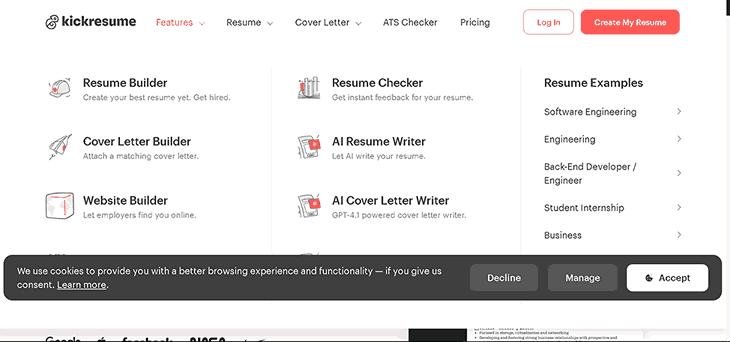
If someone asked me for a beginner-friendly AI resume builder, Kickresume would probably be one of my first recommendations.
The interface is clean, the templates look modern, and the AI writing assistant makes creating a resume much less intimidating.
Instead of starting with an empty page, you’re guided through each section one step at a time.
Overview
Kickresume is an AI-powered resume and cover letter builder that helps job seekers create professional, ATS-friendly resumes using smart writing suggestions and modern templates.
Key Features
- AI resume writer
- AI cover letter generator
- Professional resume templates
- ATS-friendly formatting
- Resume checker
- Personal website builder
- PDF export
Pros
- Very easy to use
- Beautiful resume templates
- Helpful AI writing suggestions
- Includes cover letter generation
- Great for beginners
Cons
- Some premium templates require a paid plan
- AI suggestions occasionally need editing
Pricing
Kickresume offers a free plan with premium subscriptions that unlock additional templates, AI features, and customization options.
My Experience
I rebuilt an older resume using Kickresume in less than 15 minutes.
The AI improved several weak bullet points and suggested stronger wording without making everything sound robotic.
It wasn’t perfect, but it saved a lot of editing time.
Best For
- Students
- Fresh graduates
- First-time job seekers
- Freelancers
2. Teal
Teal is much more than a resume builder.
It also helps organize your entire job search.
You can track applications, save job descriptions, and customize resumes for different positions without creating multiple files.
That became surprisingly useful once I started applying for several jobs at once.
Overview
Teal combines AI resume writing with job application tracking, making it easier to stay organized during a job search.
Key Features
- AI resume builder
- Job tracker
- Resume analyzer
- Keyword matching
- Cover letter support
- Application dashboard
Pros
- Excellent job tracking
- Easy resume customization
- ATS keyword suggestions
- Clean interface
Cons
- Some advanced features require a subscription
- Takes a little time to explore everything
Pricing
Teal offers a generous free plan with premium upgrades for additional AI features.
My Experience
The job tracker became my favorite feature.
Instead of keeping spreadsheets, I could manage applications, resumes, and interviews from one dashboard.
Best For
- Active job seekers
- Career changers
- Professionals applying to multiple companies
3. Resume.io
Resume.io focuses on speed.
If you need a polished resume quickly, this platform makes the process surprisingly simple.
The step-by-step editor is straightforward, making it difficult to get lost.
Overview
Resume.io is an online resume builder that combines professional templates with AI writing suggestions to help users create resumes in minutes.
Key Features
- AI writing assistance
- Professional templates
- Cover letter builder
- PDF downloads
- ATS-friendly layouts
Pros
- Very beginner-friendly
- Fast resume creation
- Clean templates
- Helpful writing tips
Cons
- Free downloads are limited
- Premium subscription unlocks most features
Pricing
Resume.io includes a free version with paid plans for unlimited downloads and premium templates.
My Experience
I created a complete customer service resume in about 20 minutes.
The process felt smooth, and the suggestions were practical rather than overly complicated.
Best For
- Beginners
- Office professionals
- Administrative roles
4. Enhancv
Some resume builders prioritize simplicity.
Enhancv takes a more personalized approach.
It encourages users to highlight achievements, certifications, strengths, and personality while keeping resumes professional.
Overview
Enhancv is an AI-powered resume builder designed to create visually appealing yet ATS-friendly resumes.
Key Features
- AI content suggestions
- Modern templates
- Resume checker
- Cover letters
- Custom resume sections
Pros
- Attractive designs
- Easy customization
- Good AI recommendations
- Helpful career tips
Cons
- Creative layouts may not suit every industry
- Premium plan required for full access
Pricing
Enhancv offers free access with paid plans for unlimited resumes and advanced customization.
My Experience
I liked how easy it was to personalize each section instead of forcing everything into a fixed template.
For creative professionals, that’s a big advantage.
Best For
- Designers
- Marketing professionals
- Creative careers
5. Rezi
If ATS optimization is your biggest concern, Rezi deserves serious consideration.
Nearly every feature is designed around helping resumes pass applicant tracking systems.
Overview
Rezi is an AI resume builder focused on ATS optimization and keyword recommendations.
Key Features
- ATS resume checker
- AI bullet point generator
- Resume scoring
- Keyword optimization
- Cover letter builder
Pros
- Excellent ATS optimization
- Helpful keyword suggestions
- Easy editing
- Strong resume scoring system
Cons
- Interface feels more practical than stylish
- Creative templates are limited
Pricing
Rezi offers a free version with premium subscriptions that unlock advanced AI writing and resume analysis.
My Experience
I compared a standard resume against a Rezi-optimized version.
The improvements in wording and keyword placement were noticeable without making the content feel unnatural.
Best For
- Corporate jobs
- Technical roles
- Professionals targeting ATS-heavy companies
6. Zety
Zety has been around for years, and there’s a reason it remains popular.
It combines guided resume writing with professional templates and useful content suggestions.
Even someone with very little resume-writing experience can create a polished document.
Overview
Zety is an AI-assisted resume builder offering guided writing, resume templates, and career advice.
Key Features
- AI writing suggestions
- Resume templates
- Cover letter builder
- Resume checker
- Career tips
Pros
- Easy step-by-step builder
- Professional templates
- Helpful writing guidance
- Strong reputation
Cons
- Premium plan required for full downloads
- Some templates feel traditional
Pricing
Zety provides free resume creation, while premium plans unlock downloads and additional features.
My Experience
What stood out most was how beginner-friendly everything felt.
Instead of wondering what to write next, each section included examples and suggestions that made the process much easier.
Best For
- Beginners
- Students
- Office professionals
- Anyone creating a resume for the first time
Which Tools Stood Out Most?
After testing these first six AI resume tools, each one impressed me in a different way.
- Kickresume offered the best balance of AI writing and attractive templates.
- Teal made managing job applications much easier.
- Resume.io was one of the fastest resume builders I used.
- Enhancv stood out with its modern and customizable designs.
- Rezi delivered excellent ATS optimization.
- Zety remained one of the easiest platforms for beginners.
None of them can guarantee you’ll get a job, but they can make the process of creating a strong, professional resume much faster and less stressful.
7. Novoresume
If I had to recommend one AI resume tool for students and recent graduates, Novoresume would be near the top of my list.
It doesn’t overwhelm you with dozens of options. Instead, it focuses on helping you build a clean, professional resume that recruiters can quickly scan.
One thing I liked was how it encouraged me to keep each section concise instead of stuffing every achievement onto one page.
Overview
Novoresume is an AI-powered resume builder that combines ATS-friendly templates with smart writing suggestions and resume optimization tools.
Key Features
- AI writing assistance
- ATS-friendly templates
- Resume score checker
- Cover letter builder
- One-click PDF export
- Skills suggestions
Pros
- Professional layouts
- Beginner-friendly
- ATS-compatible designs
- Helpful writing guidance
- Easy customization
Cons
- Free version has limited templates
- Some advanced features require Premium
Pricing
Novoresume offers a free plan with premium subscriptions for additional templates, AI features, and unlimited resumes.
My Experience
I created a graduate resume with no professional work experience.
Instead of making the resume feel empty, Novoresume highlighted education, projects, certifications, and technical skills in a balanced way.
Best For
- Students
- Graduates
- Entry-level professionals
8. Canva AI Resume Builder
Most people know Canva for graphic design, but its AI-powered resume builder has become surprisingly capable.
If appearance matters for your industry, Canva gives you much more creative freedom than traditional resume builders.
Just remember that highly creative templates aren’t always ideal for ATS systems.
Overview
Canva AI Resume Builder helps users create visually attractive resumes using AI writing assistance and drag-and-drop editing.
Key Features
- AI writing assistant
- Hundreds of templates
- Drag-and-drop editor
- Icons and graphics
- PDF export
- Cover letter templates
Pros
- Beautiful designs
- Extremely easy to customize
- Huge template library
- Great for creative industries
Cons
- Some templates aren’t ATS-friendly
- Advanced design features require Canva Pro
Pricing
Canva offers a generous free plan with optional Pro features for additional templates and AI tools.
My Experience
I enjoyed experimenting with different layouts.
For marketing, design, and content creation roles, Canva offers some of the best-looking resume templates available.
Best For
- Graphic designers
- Social media managers
- Creative professionals
- Freelancers
9. VisualCV
VisualCV focuses on helping professionals present themselves professionally while keeping resumes easy to update.
One feature I appreciated was the ability to maintain multiple resume versions for different industries.
That saves a lot of time when applying for several roles.
Overview
VisualCV is an AI-assisted resume builder designed for professionals who need polished resumes and online portfolio options.
Key Features
- AI writing assistance
- Resume analytics
- Multiple resume versions
- ATS-friendly templates
- Portfolio support
Pros
- Professional layouts
- Easy resume management
- Multiple resume versions
- Online sharing
Cons
- Limited customization on the free plan
- Premium templates require payment
Pricing
VisualCV provides free resume creation with premium subscriptions for advanced features.
My Experience
Managing different resume versions became much easier.
Instead of creating multiple Word documents, everything stayed organized in one dashboard.
Best For
- Experienced professionals
- Managers
- Consultants
10. Resume Genius
Resume Genius lives up to its name by simplifying the entire resume-building process.
It asks simple questions and gradually turns your answers into a polished resume.
That makes it especially useful for people writing a resume for the first time.
Overview
Resume Genius combines AI writing assistance with guided resume creation and career advice.
Key Features
- AI resume builder
- Cover letter generator
- Resume templates
- Writing suggestions
- Resume examples
Pros
- Beginner-friendly
- Step-by-step guidance
- Helpful examples
- Professional formatting
Cons
- Downloads require Premium
- Limited free customization
Pricing
Resume Genius offers free resume creation with paid plans for downloads and additional features.
My Experience
The guided approach removed a lot of uncertainty.
Instead of wondering what to write, each section included useful prompts and examples.
Best For
- Beginners
- Students
- Career starters
11. Huntr
Huntr is more than just a resume builder.
It’s designed for people actively applying for jobs and wanting to stay organized throughout the process.
Instead of juggling spreadsheets and browser bookmarks, everything stays in one place.
Overview
Huntr combines AI resume writing with job application tracking and career management tools.
Key Features
- AI resume builder
- Job tracker
- Resume optimization
- Cover letter generator
- Application dashboard
Pros
- Excellent organization
- Easy resume customization
- Helpful AI suggestions
- Good interface
Cons
- Some premium tools require a subscription
- Better suited for active job seekers
Pricing
Huntr includes a free plan with premium upgrades for advanced features.
My Experience
The application tracker became one of my favorite features.
Keeping resumes, job listings, interview dates, and application status together saved more time than I expected.
Best For
- Job seekers
- Career changers
- Professionals applying to multiple companies
12. Resume Worded
Resume Worded takes a different approach.
Instead of simply writing your resume, it analyzes what you’ve already written and tells you how to improve it.
Think of it as an AI resume coach rather than just a resume builder.
Overview
Resume Worded uses artificial intelligence to score resumes, improve wording, and increase ATS compatibility.
Key Features
- Resume scoring
- LinkedIn profile review
- ATS analysis
- AI writing suggestions
- Keyword optimization
Pros
- Excellent resume feedback
- Actionable recommendations
- ATS optimization
- LinkedIn analysis
Cons
- Doesn’t focus heavily on templates
- Better as an improvement tool than a full builder
Pricing
Resume Worded offers free analysis with premium plans for unlimited reports and recommendations.
My Experience
I uploaded one of my older resumes and received several practical suggestions.
Most recommendations were simple but noticeably improved readability.
Best For
- Resume improvement
- ATS optimization
- LinkedIn profile enhancement
13. Jobscan
If your biggest concern is getting past Applicant Tracking Systems, Jobscan deserves serious attention.
Instead of guessing which keywords recruiters want, it compares your resume directly with a job description.
Overview
Jobscan is an AI-powered resume optimization platform designed to improve ATS compatibility.
Key Features
- ATS resume scanner
- Keyword comparison
- Resume score
- Cover letter optimization
- LinkedIn analysis
Pros
- Excellent ATS optimization
- Detailed reports
- Easy-to-understand recommendations
- Great keyword analysis
Cons
- Focuses more on optimization than resume design
- Premium plan needed for unlimited scans
Pricing
Jobscan includes free scans with premium subscriptions for unlimited optimization.
My Experience
The keyword matching feature quickly highlighted important skills that were missing from my resume.
Making those adjustments only took a few minutes.
Best For
- Corporate job applications
- Large companies
- ATS-heavy recruitment processes
14. ChatGPT
Although ChatGPT wasn’t originally designed as a resume builder, it has become one of the most useful AI tools for improving resumes.
With the right prompts, it can rewrite summaries, improve bullet points, create cover letters, and even tailor resumes to specific job descriptions.
The key is providing accurate information rather than expecting it to invent your experience.
Overview
ChatGPT is a conversational AI assistant that helps users write, edit, and improve resumes, cover letters, and job application content.
Key Features
- Resume rewriting
- Cover letter generation
- Interview preparation
- Job-specific customization
- Grammar improvement
- Professional summaries
Pros
- Extremely flexible
- Great writing quality
- Useful for many career tasks
- Free version available
Cons
- Requires good prompts
- Doesn’t provide resume templates
- Always review AI-generated content
Pricing
ChatGPT offers both free and paid subscription plans with additional capabilities in premium tiers.
My Experience
I often use ChatGPT to rewrite weak bullet points and customize resumes for different job descriptions.
It saves time, but I always verify every suggestion before using it.
Best For
- Freelancers
-
Professionals
- Students
- Career changers
15. BeamJobs AI Resume Builder
BeamJobs is designed with one goal in mind—helping job seekers create resumes that match specific careers.
Instead of offering generic suggestions, it provides examples tailored to hundreds of different job titles.
Overview
BeamJobs AI Resume Builder combines AI writing with career-specific resume examples and ATS-friendly templates.
Key Features
- AI resume writing
- ATS-friendly templates
- Job-specific examples
- Cover letter builder
- Resume customization
Pros
- Industry-focused examples
- Easy-to-use interface
- Helpful AI suggestions
- Good ATS compatibility
Cons
- Premium features require payment
- Smaller template library than some competitors
Pricing
BeamJobs offers free resume creation with premium features available through subscription plans.
My Experience
The career-specific examples were genuinely helpful.
Instead of generic advice, I saw resume samples written for roles similar to the ones I was targeting.
Best For
- Professionals
- Recent graduates
- Job seekers changing industries
Best Free AI Resume Tools
Not everyone needs a paid subscription to create a professional resume.
Several free AI resume tools provide enough features for students, graduates, and even experienced professionals.
Some of my favorite free options include:
- ChatGPT for rewriting and improving resume content.
- Kickresume for beginner-friendly resume creation.
- Teal for resume building and job tracking.
- Novoresume for ATS-friendly templates.
- Canva AI Resume Builder for creative resume designs.
If you’re creating your first resume, the free plans are usually enough. You can always upgrade later if you need advanced templates, unlimited downloads, or deeper AI features.
How to Choose the Right AI Resume Tool
After testing all these AI resume tools, I realized something important.
There isn’t one tool that’s perfect for everyone.
The best choice depends on your career stage, budget, and the type of jobs you’re applying for.
Here’s what I’d recommend based on different situations.
Best for Students
If you’re still in college or have little work experience, look for a tool that guides you through the writing process instead of expecting you to know what to write.
Recommended Tools
- Kickresume
- Novoresume
- Resume Genius
- ChatGPT
These tools make it easier to highlight projects, certifications, internships, and academic achievements.
Best for Fresh Graduates
Graduates often need resumes that look professional while emphasizing transferable skills.
Recommended Tools
- Teal
- Rezi
- Zety
- BeamJobs
These platforms offer strong AI writing assistance and ATS-friendly formatting.
Best for Experienced Professionals
If you’ve worked for several years, your resume needs to showcase achievements rather than simply listing responsibilities.
Recommended Tools
- VisualCV
- Teal
- Jobscan
- Resume Worded
These tools help tailor resumes for leadership roles and industry-specific positions.
Best for Freelancers
Freelancers usually work on multiple short-term projects instead of having traditional employment history.
A good AI resume tool can organize those projects into a format recruiters understand.
Recommended Tools
- Canva AI Resume Builder
- ChatGPT
- Kickresume
- BeamJobs
Best for Career Changers
Changing careers means highlighting transferable skills instead of previous job titles.
Recommended Tools
- ChatGPT
- Resume Worded
- Teal
- Rezi
These tools make it easier to rewrite your experience for a completely different industry.
Step-by-Step Guide to Creating an ATS-Friendly Resume with AI
Many people think AI does everything automatically.
It doesn’t.
The best results come from combining your own experience with AI suggestions.
Here’s the process I usually follow.
Step 1: Choose an ATS-Friendly Template
Start with a simple, clean layout.
Avoid templates filled with graphics, multiple columns, or decorative icons if you’re applying online.
Simple resumes are easier for Applicant Tracking Systems to read.
Step 2: Add Accurate Information
Include:
- Contact details
- Professional summary
- Work experience
- Education
- Certifications
- Skills
- Projects
Don’t worry about perfect wording yet.
Just focus on accuracy.
Step 3: Let AI Improve the Writing
Now use the AI features to improve:
- Bullet points
- Action verbs
- Grammar
- Professional tone
- Readability
This is where most resume builders save you a significant amount of time.
Step 4: Match the Job Description
Every job posting contains important keywords.
Instead of sending the same resume everywhere, compare your resume with the job description.
Many AI resume tools can identify missing skills and recommend improvements.
Step 5: Generate a Cover Letter
A personalized cover letter still matters.
Most AI resume builders can create one using the information already included in your resume.
You’ll still want to personalize it before submitting your application.
Step 6: Proofread Everything
Never submit a resume without reviewing it.
Check:
- Dates
- Company names
- Job titles
- Grammar
- Formatting
- Contact information
Even excellent AI tools occasionally make mistakes.
Common Mistakes to Avoid
Using AI can make resume writing easier, but it can also create problems if you rely on it too much.
These are the biggest mistakes I’ve seen.
Letting AI Invent Experience
This is probably the worst mistake.
Some AI tools generate achievements that sound impressive but never actually happened.
If you can’t explain it during an interview, don’t include it.
Copying Generic Summaries
Recruiters read hundreds of resumes.
If your professional summary sounds like everyone else’s, it won’t stand out.
Always personalize AI-generated content.
Ignoring ATS Keywords
A beautiful resume won’t help if it never reaches a recruiter.
Read the job description carefully and include relevant skills naturally.
Choosing Style Over Readability
Creative templates look great, but they’re not always ATS-friendly.
If you’re applying online, simple layouts usually perform better.
Sending the Same Resume Everywhere
One resume doesn’t fit every job.
Even small changes to your skills, summary, and experience can make your application more relevant.
Forgetting to Proofread
AI isn’t perfect.
Always read every sentence before downloading your resume.
A few minutes of proofreading can prevent embarrassing mistakes.
Frequently Asked Questions
What is the best AI resume tool?
There’s no single winner for everyone.
If I had to recommend one overall, Kickresume offers the best balance of AI writing, professional templates, and ease of use.
Are AI resume builders ATS-friendly?
Most leading platforms, including Rezi, Jobscan, Kickresume, and Novoresume, offer ATS-friendly templates.
However, it’s still important to keep your formatting clean and relevant to the job.
Can AI write my entire resume?
Yes, but it shouldn’t.
AI can create an excellent first draft, but only you know your real achievements and career history.
Always review and personalize everything before applying.
Are free AI resume tools good enough?
For many people, yes.
Students, graduates, and first-time job seekers can often build a strong resume using free plans.
Paid subscriptions mainly unlock additional templates, unlimited downloads, and advanced AI features.
Can employers detect AI-written resumes?
Recruiters don’t usually reject resumes simply because AI helped write them.
What matters is whether the information is accurate, personalized, and relevant.
A generic AI-generated resume with fake achievements is much easier to spot than one you’ve carefully edited.
Should I use AI to write my cover letter, too?
Yes, but treat it as a starting point.
AI can save time by generating a draft, but adding your own voice and tailoring it to the company will make it much stronger.
Final Thoughts:
Before I started using AI resume tools, I thought creating a professional resume meant spending hours adjusting fonts, rewriting sentences, and constantly second-guessing every word.
After testing the tools in this guide, I realized that’s no longer necessary.
The best AI resume tools don’t replace your experience—they help you present it more clearly. They can improve weak wording, organize your achievements, suggest relevant keywords, and make the entire process faster.
That said, AI isn’t a shortcut to getting hired.
Employers still value honesty, relevant skills, and a resume that reflects your real experience. If you let AI exaggerate your achievements or generate information that isn’t true, it can easily work against you during an interview.
My advice is simple: use AI as your writing assistant, not your replacement.
Choose one tool that fits your needs, spend time reviewing every suggestion, and customize your resume for each job you apply for. Those small extra steps can make a much bigger difference than relying on automation alone.
A well-written resume won’t guarantee your dream job, but it will give you a much stronger chance of getting your foot in the door. And sometimes, that’s all you need to land the interview that changes your career.